

This week I’ve been thinking about...
iPhone Duo is now available to everyone with Xcode, because you can run the simulator, fold the device, and play with it.
People online already show interesting ways to use the features of a foldable phone, and Apple published new guidelines and announced workshops, so it looks like Apple is fully in on the foldable story. The simulator is not a real device, and we are still waiting to test our apps on one in person, but I am sure you can find most of the bugs by launching your app in the iPhone Duo Simulator.
This issue covers the new APIs and tools you should know if you want to support iPhone Duo. And based on last week's poll, most of you plan to support it, which makes me happy 😊
What’s New
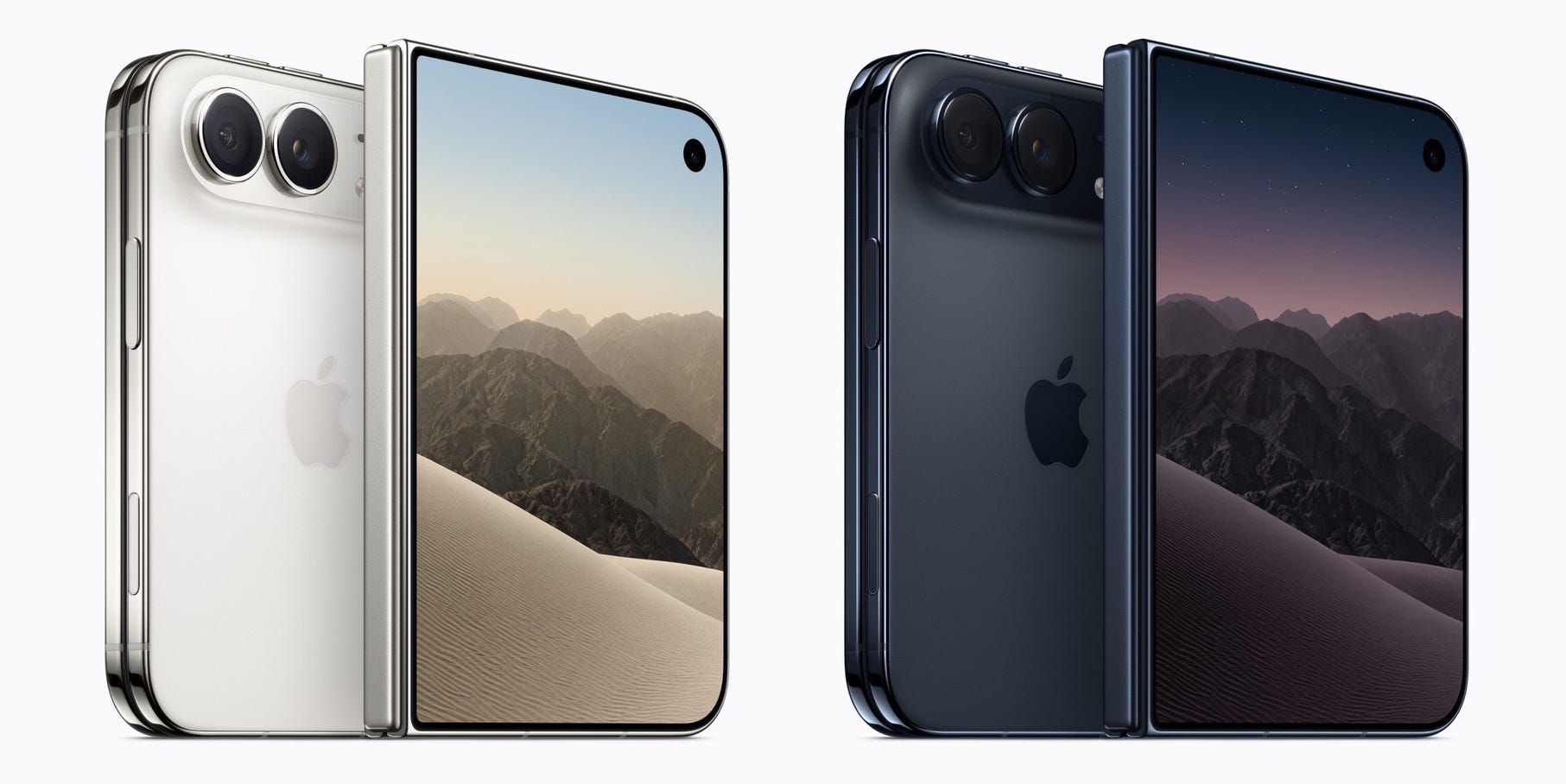
Build for iPhone Duo with new resources
Apple released Xcode 27.1 beta with iPhone Duo support 🎉
Take a look at Apple Design Resources, here you can find Figma and Sketch design kits. There are also workshops about how to build apps for all screen sizes. Btw, don’t forget to update to the new beta to see how your app behaves before the device ships.
Releases
Must Read
As I said before, if you build for iPad, iPhone Duo support comes for free, and it works the other way too. The article explains why and how you should design for flexible, adaptive space instead of one specific device. Great read.
iPhone Duo Simulator: Testing and optimizing your SwiftUI app
Since you now have the complete set of tools for the iPhone Duo, you should begin preparing your app for it. Here you can see the problems you might encounter, how to test your app in different orientations, and which new SwiftUI APIs will assist you in adapting. This isn't a physical device yet, but you can see how your app performs…
ArrangementView: Think Before You Arrange
The first thing I think of whenever a new API is released is “Cool, let’s use it!” However, new APIs have their own pros and cons, and sometimes the earlier method is simpler, clearer, and has been proven over time. We have a similar situation with ArrangementView. In this article, you can find out where we need to use the new UI component and how to choose between ArrangementView and a simple HStack or ZStack.
What is State actually doing in SwiftUI
Many people think the way state works in SwiftUI is magic. But special rules and systems work in the background. In this article, you’ll learn how one of these mechanisms works and what happens when you use State.
Parameterized tests and test organization with Swift Testing
A while ago, my team began switching to Swift Testing, and one of my favorite features of the framework is its support for parameterized tests. Instead of writing four separate tests, you can write one test and pass the inputs as arguments. So, a single reusable test can handle all cases. Cool, isn’t it? The article explains how to set this up and also how to organize a growing suite using tags and nested suites.
Quick Read
// The annotation makes the compiler flag this wrapper once your target reaches the new API
@available(iOS, introduced: 26.0, deprecated: 27.1, message: "Remove the ported version")
extension View {
    @ViewBuilder func portedToolbarVerticalBehavior(disabled: Bool) -> some View {
        if #available(iOS 27.1, *) {
            toolbarVerticalBehavior(disabled ? .disabled : .automatic) // new API on 27.1+
        } else {
            self // nothing to do on older versions
        }
    }
}
Video
Fully Working SwiftUI Voice/Vision App Using Gemini
Here is a walkthrough of how to create a real-time voice and vision assistant for iOS, something similar to Gemini Live. I have used Gemini in my own side project, and it still amazes me how simple it is to make any app smarter through a basic AI integration.
Toolbox
This tool checks the Swift and SwiftUI code produced by your AI agent. It provides findings with explanations and code examples. All advices stay outside the agent’s context, so the agent uses fewer tokens for general background information.
iOS Job Market (USA)
92 new iOS positions this week (+3% vs last week · +96% vs last month)
Senior / Mid / Junior — 48% / 48% / 4%
Most wanted skills: SwiftUI 61% · UIKit 37% · Combine 27% · MVVM 24%
This week’s picks:
Senior Engineer, iOS at Fanatics (New York, NY) — Builds Fanatics Live’s real-time card breaks and auctions in Swift, SwiftUI, and Swift Concurrency using a TCA codebase → Apply
Senior iOS Engineer, Media Experience at Reddit (San Francisco, CA) — Owns the native video architecture behind Reddit’s Media Experience team, using AVFoundation to push playback quality and live-streaming engagement for a platform with 130M+ daily active visitors → Apply
Staff UX Engineer, iOS Development, Search at Google (Los Angeles, CA) — Prototypes SwiftUI-driven interfaces for Search on iOS, sitting at the intersection of UX design and engineering with 8+ years of front-end/UX engineering experience expected, including 3+ years in SwiftUI → Apply
Weekly Poll
📊 Last Week’s Poll Results
Are you planning to fully support iPhone Duo in your app?
Top Answer: Yes
Upcoming Conferences
September
29–2 — MacSysAdmin (Gothenburg 🇸🇪)
October
7–9 — Next.App DevCon 2026 (Berlin 🇩🇪)
12–14 — SwiftLeeds 2026 (Leeds 🇬🇧)
November
2–3 — Swift Connection (Paris 🇫🇷)
10–12 — Do iOS 2026 (Amsterdam 🇳🇱)
19–20 — Swift Bharat (Mumbai 🇮🇳)
20–22 — SwiftSonic 26 (Nashville 🇺🇸)
February 2027
16–18 — ARCTIC Conference (Oulu 🇫🇮)
March 2027
2–4 — try! Swift Tokyo 2027 (Tokyo 🇯🇵)
16–18 — Appdevcon 2027 (Amsterdam 🇳🇱)
September 2027